
資安弱點掃描 Nessus OWASP
UBMail
SMTPs
目前版本支援到 TLSv1.3
郵件伺服器
SMTP服務設定
進階設定
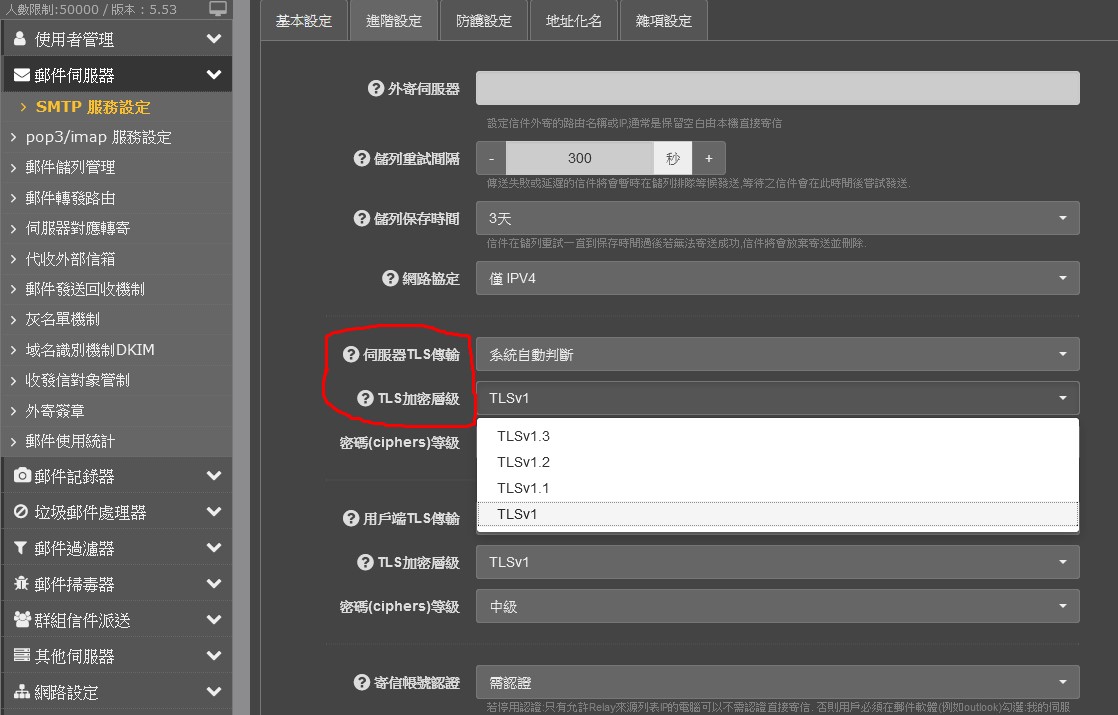
TLSv1.3
TLSv1.2
TLSv1.1
TLSv1
收到
Untrusted TLS connection established
came back to me and mentioned the Pfiff server use TLS 1.2 encryption, while SSI`s server still use TLS 1.0 encryption and therefore reject the receipt of the mails.
He also mentioned TLS 1.0 is not conform with the EU laws ( 歐盟一般資料保護規範 ) and is therefore asking if we could update our security standard to TLS 1.2.
Pfiff security standard: TLS 1.2
SSI security standard: TLS 1.0
--> SSI server reject mail
這邊調整看看
伺服器TLS傳輸 : 系統自動判斷
TLS加密層級
密碼(ciphers)等級
用戶端TLS傳輸 : 系統自動判斷
TLS加密層級
密碼(ciphers)等級
用戶端調高
影響到的應該是 Windows XP , Windows 7
伺服器端
中華電信電子發票通知函 TLSv1.2
調太高中華電信的電話電子帳單通知信 TLSv1.3 有可能不會過
因為不會往下相容
如果因為 Outlook 版本過舊
請閱讀相關文章
UMail 搭 Outlook 2013 設定 port 465 SSL 或是 port 587 TLS 或是 starttls port 25 方法

寄信帳號認證
supports the use of anonymous SSL ciphers
停用認證
需認證
需認證且必須SSL/TLS連線
調整其他的 WebMail WebAdmin 管理介面方式
相關文章閱讀
UMail 調整 SSL TLS 等級問題 ssllabs test,SSL DV OV IV EV 差異